

In a lot of project evaluations, people always end up asking the same question: what’s actually the difference between a data center switch and a campus switch? Can you mix and match them? How do you even choose? On the surface it looks like it’s just about port speed, price, and brand. But fundamentally, these are two completely different network philosophies. If you only look at the hardware, it’s easy to get it wrong. Once you understand the underlying network models and the nature of the traffic, the answer becomes crystal clear. Let’s break down the differences and trends between data center and campus networks today — guaranteed to be easy enough for a complete beginner.
What Is a Data Center Network?
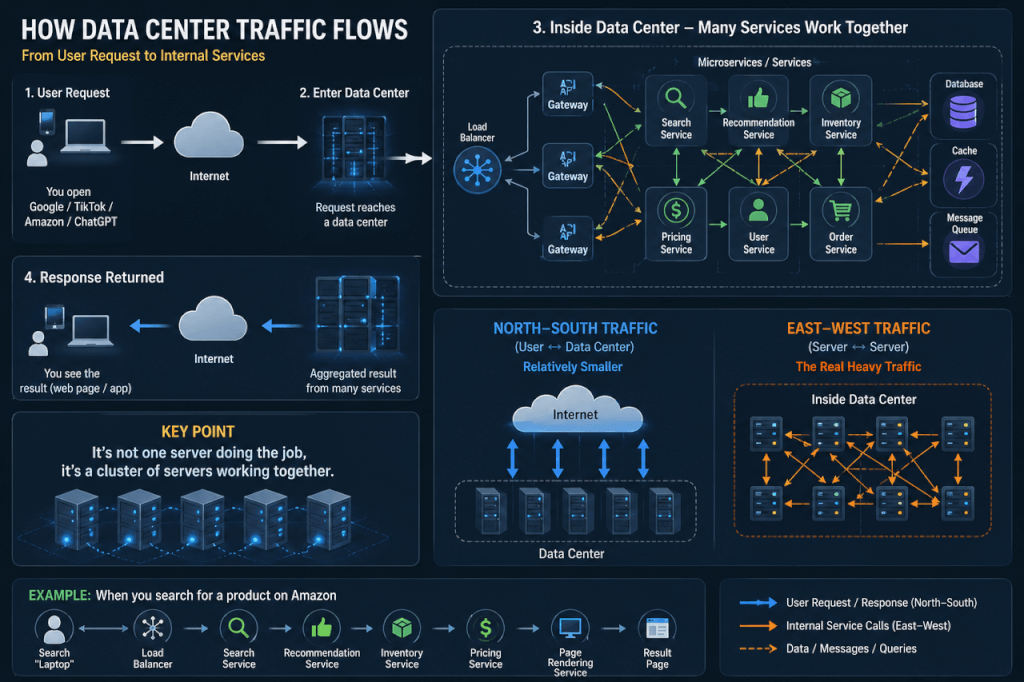
Let’s start with the data center. A lot of people feel like it’s something remote and abstract — but the truth is, you use it every single day. Every time you open Google, scroll TikTok, buy something on Amazon, or chat with ChatGPT, you’re essentially accessing servers sitting inside a data center somewhere. What you see is a webpage. But behind the scenes, a whole cluster of services is working together to make that happen.
When you make a request, here’s what’s actually going on: You → Internet → Data Center → Multiple servers collaborate → Result comes back. The key insight: it’s not one server doing the work. It’s an entire server cluster working in concert. Take a real example: when you search for a product on Amazon, what’s firing behind the scenes might be:
- A search service node
- A recommendation engine
- An inventory database
- A pricing system
- A page rendering service
Multiple services running simultaneously, all stitched together into the page you see. So where is the real traffic? It’s inside. Most people assume the heaviest load is the “user access” leg of the journey. In modern applications, though, the communication between servers inside the data center is where the majority of traffic actually lives. That’s what we call:
East-West Traffic: Server ↔ Server ↔ Server
So What Does a Data Center Switch Actually Do?
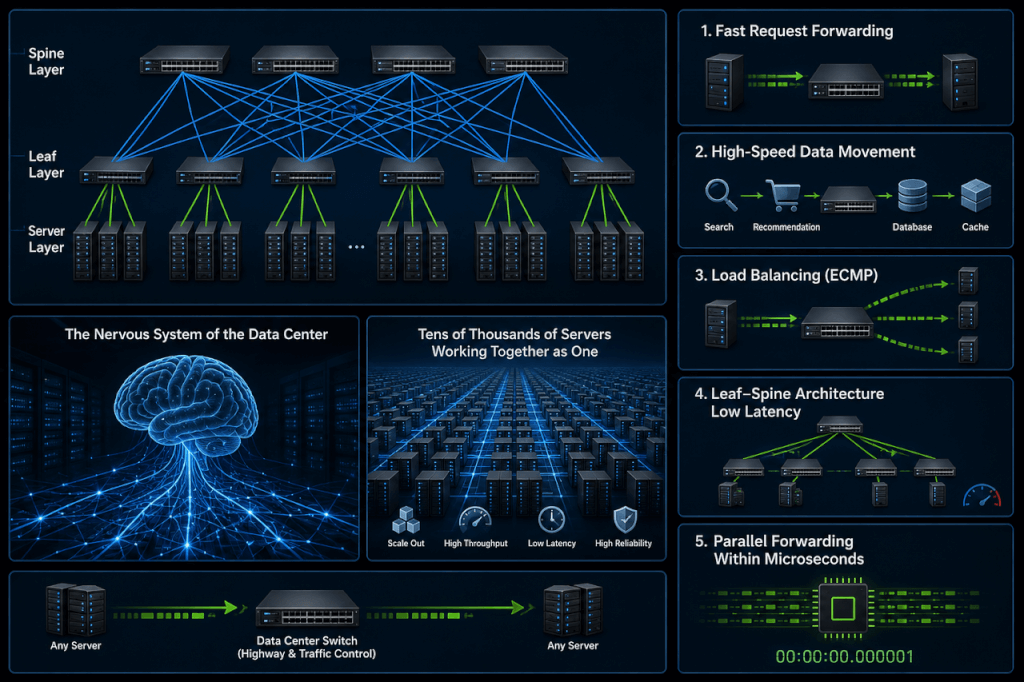
One sentence: they are the “high-speed highway + traffic control center for inter-server communication” — built specifically to handle the relentless flood of East-West traffic between servers. None of those server-to-server calls happen point-to-point. They all flow through the data center switching fabric:
- Rapidly forwarding requests from one service to another
- Shuttling data at high speed between search, recommendation, database, and cache tiers
- Load balancing (ECMP, multipath forwarding)
- Using Leaf-Spine architecture to flatten latency between any server and any other server
- Handling massive concurrent forwarding in microseconds — or even nanoseconds
So a data center switch isn’t fundamentally a “box that plugs in cables.” It’s the nervous system that makes the entire data center operate like one massive parallel computer. In essence: it’s the transportation grid that lets tens of thousands of servers efficiently talk to each other and get work done together.
In the age of AI, all of this is pushed to an extreme. During model training, thousands of GPUs run simultaneously, and every single step requires parameter synchronization — which is essentially every node talking to every other node at once. At that point, any slowdown or jitter in the network gets amplified many times over. Even a 1% slowdown can add a significant chunk of time to the total training run. So the question data center networks have to answer stopped being “can we connect?” long ago. The real question is: “can we stay fast, stay stable, and never get congested?”
What Does a Data Center Network Actually Need?
It needs massive bandwidth so data can actually move. It needs ultra-low latency so compute resources aren’t left waiting around. Even more importantly, that latency needs to be stable — jitter is often more deadly than outright slowness. There can’t be obvious bottlenecks anywhere; every node needs to communicate with every other node without friction. One path isn’t enough — there need to be multiple paths for automatic load distribution. And when a link or device fails, recovery needs to happen in an extremely short window without impacting the overall system.
Go a level further and you also need to think about scale — expanding from dozens of servers to tens of thousands without the architecture collapsing under its own weight or becoming exponentially more complicated.It’s precisely under these constraints that data center networks evolved into what we now consider standard capabilities: INT, BGP EVPN, EVPN Multihoming, RoCE, and a full suite of congestion control mechanisms.These might sound like textbook jargon, but none of them exist for elegance. Every single one of them was forced into existence by real outages and real scaling pressure:
- As server counts grow, hardware failures become routine — so EVPN Multihoming was developed to ensure that local failures don’t take down the broader business;
- As VMs, containers, and workload mobility increase — BGP EVPN was brought in to enable large-scale, automated network orchestration;
- Stable latency — because jitter is often more damaging than raw slowness
- As AI training and high-performance storage push latency and throughput toward their absolute limits — lossless network mechanisms like RoCE + PFC/ECN got pushed to the forefront.
INT (In-band Network Telemetry) is essentially a mechanism that makes each packet carry real-time information about latency, congestion, and queue depth at every hop it traverses — so network issues no longer require post-mortem guesswork. They can be pinpointed to a specific path and a specific node.
At the end of the day, all of these changes point to the same reality: the network is no longer just a pipe connecting compute. It’s the underlying system that determines whether computing power can actually be unleashed.
What Is a Campus Network?
Campus networks are something you actually use every single day — you just never think about them.
You arrive at the office in the morning, open your laptop, connect to Wi-Fi or plug in a network cable. From that moment on, you’re on the campus network. And every “small thing” you do from there is running across it:
You message a colleague on Teams or Slack. You open ERP, OA, or CRM to pull some data.
You send a file to the printer. You join a Zoom or Teams meeting. You scan your badge at the door. You clock in. All of these operations, as mundane as they feel, depend on one thing operating silently in the background: the campus network.If you had to describe what it fundamentally is in one sentence, it’s actually simple: a campus network is the digital foundation that connects people, devices, and business systems together. It’s not connecting cold machines. It’s enabling every single act of work you do each day.
So What Does a Campus Switch Do?
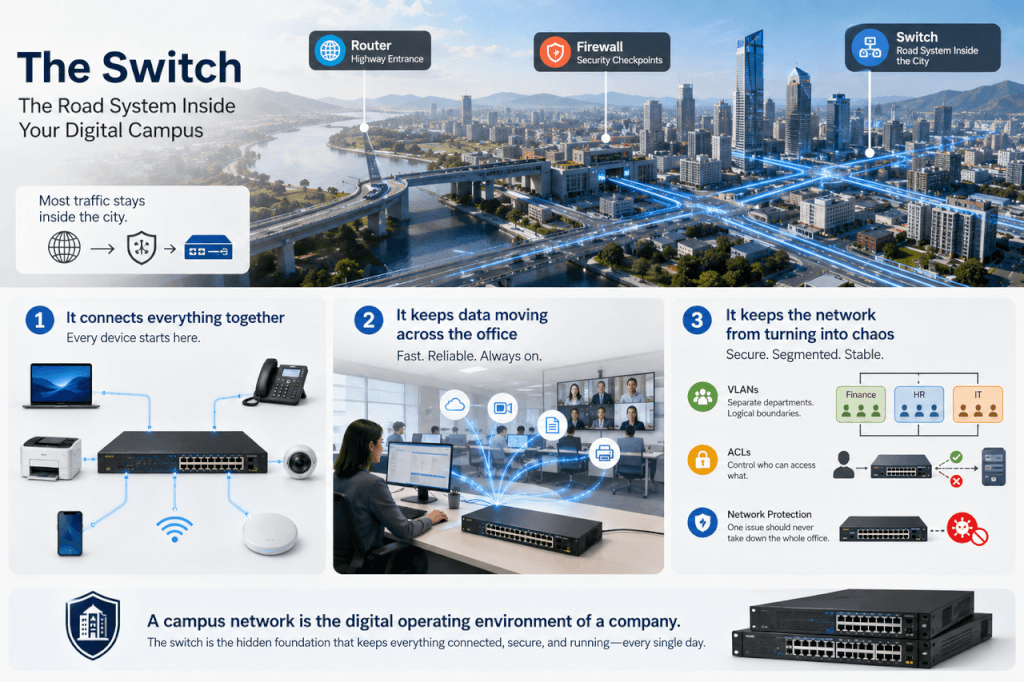
Think of it this way: if the entire campus network were a city —
- The router would be like the highway on-ramp at the city’s edge
- The firewall would be security checkpoints and toll gates
- And the switch would be the road network inside the city itself
Every piece of data that “moves” inside your company is fundamentally traveling across that road network.
Simply put, a campus switch does three main things:
First: connect everything in. Your laptop, desk phone, printer, security camera — they all connect to a switch first. Without it, there’s no such thing as “getting on the network” in the first place.
Second: keep data moving around the office. When you open a system, the request needs to reach the server. When you’re in a video call, audio and video need to flow in real time. When you print, the file needs to reach exactly the right printer.
All of that data is constantly being forwarded between switches. The job is simple, but critical: get the data to the right place, fast.
Third: keep the network from turning into chaos.
- Segmenting different departments (Finance, HR, IT each stay on their own lane) — that’s VLAN configuration
- Rules about who can access which systems — that’s ACLs (Access Control Lists)
- Preventing one device’s problem from dragging the entire office down
These fundamental control capabilities are also the switch’s job. So fundamentally, a campus network isn’t just “transmitting data.” It’s more like a company’s digital operating environment — making sure every click, every meeting, every document happens smoothly. And the campus switch is the most invisible but most indispensable layer of foundation underneath all of it.
Traditional Campus Network Topology: The Three-Tier Architecture
When you look at a traditional campus network topology, your first impression is usually: tidy. Almost textbook. They all pretty much look the same — a three-tier structure, stacked layer by layer from bottom to top: Access, Aggregation, Core. Think of it like a multi-story office building.
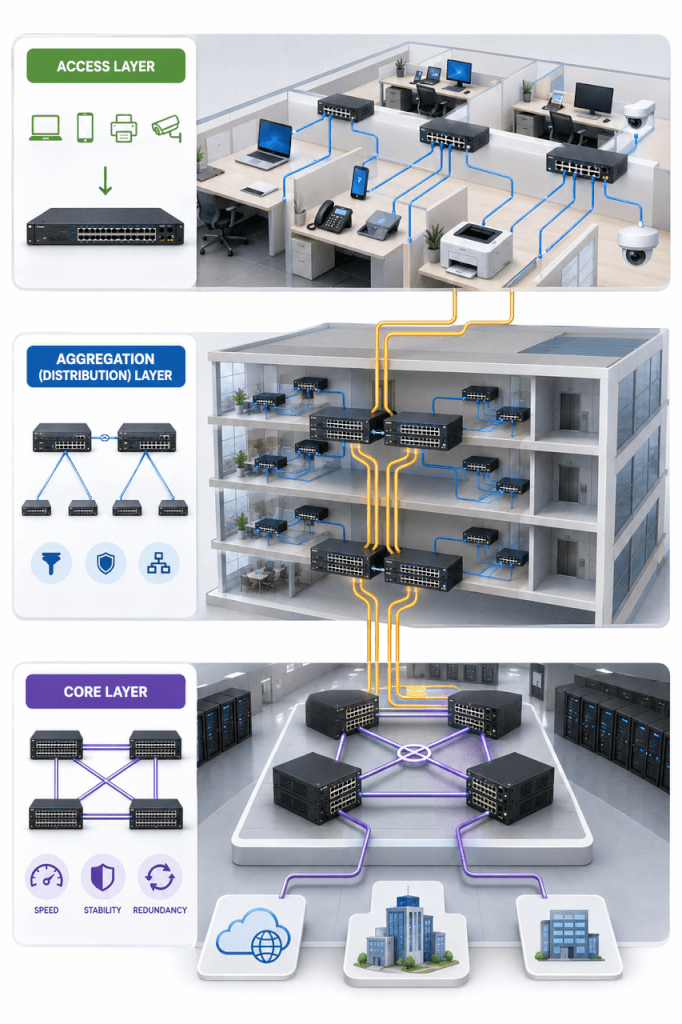
The bottom tier is the Access Layer — the layer of the network closest to you. Your desktop, desk phone, printer, and security camera all connect here first. Think of it as a very straightforward role: pulling every person and device into the network. Without this layer, “getting online” doesn’t even exist.
One level up is the Aggregation Layer. This tier takes on more of an “organizer” role. It doesn’t face users directly — it faces a bunch of access switches. A single floor or zone might have several access devices, and all of them connect upward into the aggregation layer.
What it does can basically be understood as two things: first, consolidating the scattered traffic from below; and second, handling some light-touch “management” along the way — zoning off areas, controlling access, making sure traffic from different areas can reach each other. It’s like taking a bunch of narrow side streets and gradually merging them into a few main roads.
The top tier is the Core Layer — the overall hub of the campus network. Isn’t particularly complex, but it’s absolutely critical. Inter-floor access, inter-department communication, even internet access — it all flows through here.
There’s not much fancy going on at this layer. The requirements come down to three things: fast, stable, and never goes down. So you’ll find this layer uses the best equipment, the most bandwidth, the most redundancy — because if something goes wrong here, it’s basically a site-wide outage.
If you had to sum up the whole topology in a single sentence: all traffic goes up first, then comes back down. If you’re in Building A trying to reach a computer in Building B, the path will almost certainly be: from your machine → to access → up to aggregation → up to core → then back down layer by layer → to the destination device. Sounds reasonable, right?
Campus Network vs. Data Center Network: Architecture Comparison
| Dimension | Campus Network | Data Center Network |
|---|---|---|
| Core Purpose | Supports enterprise office work and business access | Supports large-scale computing and service communication |
| Target Users | People (employees, guests, end devices) | Machines (servers, storage, applications) |
| Traffic Model | North-South traffic (user ↔ system) | East-West traffic (system ↔ system) |
| Typical Applications | Internet access, email, OA, ERP, video conferencing | Cloud computing, microservices, database communication, AI training |
| Architecture | Three-tier architecture (Access / Aggregation / Core) | Leaf-Spine architecture |
| Design Philosophy | Hierarchical, centralized management | Distributed, high concurrency, multi-path |
| Forwarding Pattern | More fixed paths with hierarchical hops | ECMP multi-path, low latency routing |
| Scalability | Vertical scaling (layer-by-layer expansion) | Horizontal scaling (add Leaf/Spine nodes) |
| Key Technologies | VLAN, ACL, STP, QoS | ECMP, RDMA, VXLAN, Load Balancing |
| Main Goal | Stability, manageability, user experience | Performance, low latency, high throughput |
| Failure Impact | Impacts user productivity and office operations | Impacts compute workloads and service continuity |
| Network Analogy | Office building / structured hierarchy | Highway grid / distributed system |
| Typical Port Speeds | 1G – 100GbE | 25G – 800GbE |
Why Three-Tier Architecture Isn’t Enough Anymore
But that’s exactly where the problem lies. This structure used to be perfectly adequate. Back then, most traffic followed the “person accessing a server” model — a single direction, simple workloads, manageable bandwidth pressure.
Today it’s different. Video conferencing, cloud apps, and SaaS are proliferating, and a lot of traffic has started flowing laterally “inside” the network. Systems are calling each other more and more frequently, and sensitivity to latency keeps increasing.
When you force all that traffic to “climb up first and then come back down,” problems start appearing:
- Longer paths mean higher latency — that’s just physics
- Everything going through the core turns the core into a bottleneck
- Scaling up isn’t flexible — you’re basically just stacking layers on top
And so you notice an interesting shift: this traditional three-tier architecture is fundamentally a centralized design. Meanwhile, networks today are slowly moving toward something flatter and more distributed.
The Convergence of Data Center and Campus Networks
Over the past few years, there’s been a very clear trend: the design philosophy of the data center is bleeding into campus networks. The reason isn’t complicated — the workloads running in campus environments have gotten heavier. Video, AI applications, and big data analytics have started entering the office environment, East-West traffic is increasing, and expectations around stability and convergence speed keep rising.
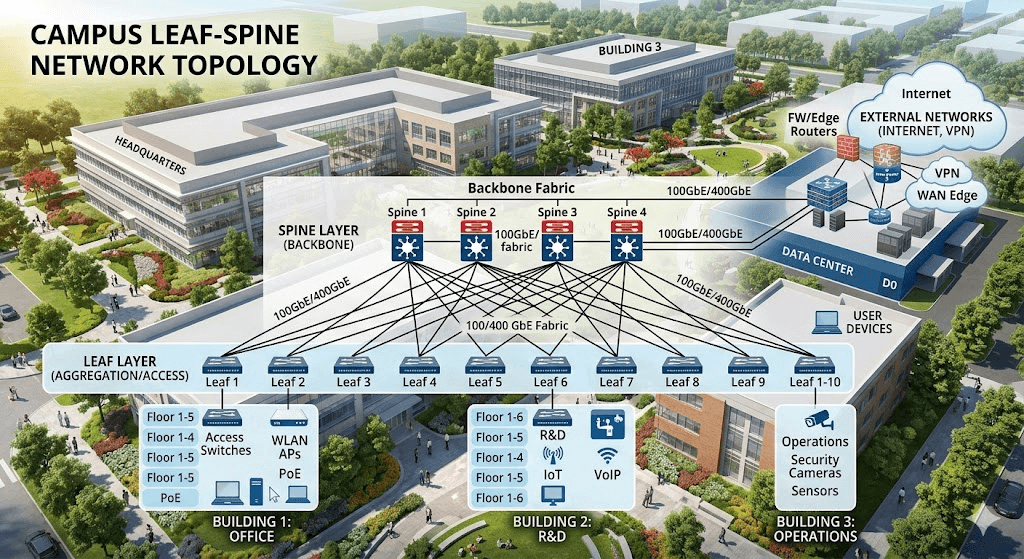
So you start seeing changes: networks moving away from traditional Layer 2 toward Layer 3; the STP-based tree topology giving way to ECMP-based multipath; the shape going from “looks like a tree” to “looks more like a mesh” — and Leaf-Spine-style campus network designs starting to emerge.
To be continued — see the next installment.