
Overview
Automated burn-in testing and shipment imaging are the last checkpoints before a server leaves the factory: burn-in verifies hardware stability, and shipment imaging loads the final production image. When a production line automates both, the network has to absorb hundreds of servers booting and downloading images at the same moment.
This guide describes a reference architecture from Asterfusion for this type of environment, built on AsterNOS, Asterfusion’s enterprise network operating system. Asteraix is Asterfusion’s authorized distributor in Portugal and provides certified sales, integration and technical support for solutions of this kind.
The workload: what the network has to carry
Production scale in the reference deployment. Phase one plans four independent production lines. Each line has 11 automated aging racks, and each rack has four tiers with 88 test positions and two leaf access switches. A single line supports nearly a thousand (968) servers under test at the same time. Across all four lines the capacity is close to 4,000 positions, served by 88+ access switches.
Automated aging racks. Every tier carries an embedded control board that drives a red, yellow and green LED strip running along the rack. After a server powers on, its test script queries the access switch over SNMP to learn its physical port index and LLDP topology, then reports its physical position and test status to the control board. The strip signals:
•🟡Yellow: booting, downloading an image, or running test scripts
•🔴Red: a hardware or stress-test item failed; the position is locked for repair
•🟢Green: all tests passed; the unit can move on to packaging
Two heavy flows.
• Download Test: newly assembled servers PXE-boot and pull a customized, streamlined test system image (about 10 GB), then fetch stress-test tools and aging scripts.
• Download Shipment: servers that passed aging are flashed by PXE with the final production image (up to 20 GB), containing the commercial operating system, drivers and the customer’s business environment.
Where conventional networks fall short
1. Burst traffic saturates 10G uplinks. During production peaks, 200 to 300 servers can request PXE images within seconds. On access switches with 10G uplinks, this creates traffic bursts several times the uplink capacity. Uplink utilization stays pinned at 100%, which leads to packet loss, queueing jitter and TCP exponential backoff. Image pulls become very slow, TFTP/PXE connections can time out, and operators have to reset and retest machines by hand.
2. SNMP lookups get starved. Boot scripts send dense SNMP queries to learn port mapping while images are downloading. If the switch lacks fine-grained QoS queue scheduling and CPU protection, those control packets are dropped. The LED strips then light up late or show false red alarms, and the automation system raises repeated alerts.
3. Many switches, no central view. With 88+ access switches across four lines, firmware upgrades, VLAN assignment and ACL changes done through per-device CLI are slow and error-prone. Without telemetry, intermittent micro-burst loss is hard to trace and locate.
Reference architecture
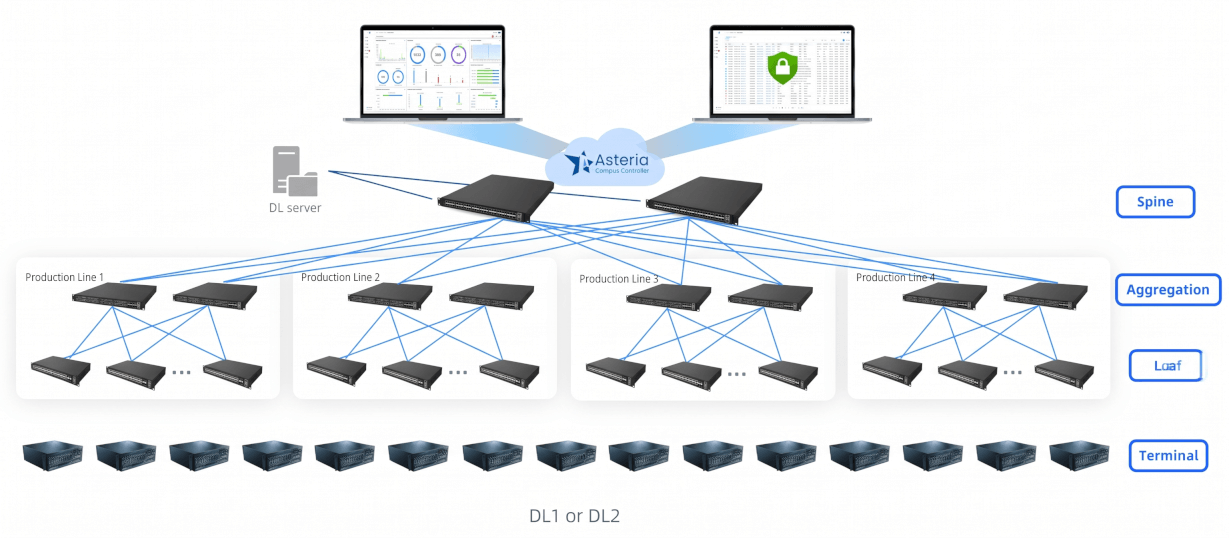
The design separates the workload into two independent clusters: a DL1 test cluster and a DL2 shipment cluster. Their traffic is fully isolated. Only the management channel connects through the existing enterprise network, with access-control policies keeping the core network and production network apart.
Spine Layer: 2 × CX308P-48Y-M-H, Data-center-class switches with high-density 25GE/100GE. The PXE test servers attach directly over 100G NIC links, so image output from the source is not throttled.
Aggregation Layer: CX202P-24Y-M-H, Carries the large Spine traffic volume, provides high-density 25G fan-out and aggregates the dozens of access switches across the four lines.
Leaf (access) Layer: CX204Y-48GT-M-S (multiple units), 48 gigabit copper ports connect directly to the test positions. Dual-homed 25GE SFP28 uplinks raise leaf uplink capacity from 10G to 25G/50G.
Controller: Asteria Network Controller, Deployed out-of-band at the aggregation layer for unified management of the whole fabric, including all 88+ access switches.
Design principles
• Match bandwidth in steps. Servers feed the Spine at 100G and leaf switches uplink at 25G, so bandwidth matches from end to end. The goal is for the fabric to absorb a simultaneous PXE request from 300 devices with smooth buffering and line-rate forwarding.
• Isolate workloads. Test-image traffic and shipment-image traffic run on separate clusters and cannot disturb each other.
• Protect the management plane. AsterNOS gives the management plane and SNMP query queue high-priority scheduling (CoPP / QoS), even while the switch handles dense burst traffic. A server’s SNMP request for its port location is answered in milliseconds, so the control board and LED strip react in real time.
• Manage everything from one place. A centralized controller removes per-device CLI work.
Asteria Network Controller capabilities
• Automated provisioning: one-click batch push of VLAN, QoS, port rate-limit and mirroring policies; newly installed leaf switches are plug-and-play.
• Telemetry: continuous collection of port utilization, buffer queue depth, drop counters and other micro-burst indicators, so operators are not working blind.
Reference results
In the reference deployment, measured under full load with 200 to 300 concurrent servers, image download and installation times fell from the legacy 10G-uplink design as follows:
Test image download (about 10 GB). Before the upgrade, a download took 18 minutes 30 seconds, and up to 22 to 25 minutes at peak congestion, with occasional timeouts. After the upgrade it takes 7 minutes 15 seconds, delivered stably at line rate with no timeouts. That is a 60.8% reduction in time.
Shipment image installation (about 20 GB). On the legacy network the 10G uplinks stayed continuously full and retransmissions were severe, so installation took 38 minutes 40 seconds. With full line-rate download, the whole batch is now flashed steadily in 15 minutes 50 seconds. That is a 59.1% reduction in time.
Concurrent download success rate. With 300 servers downloading at once, the success rate was 87.5% before the upgrade, and about 10 to 15% of nodes needed a manual restart. After the upgrade, all nodes passed on the first boot, a success rate of 100% and an improvement of 12.5 percentage points.
SNMP port-location latency. Under concurrent load, queries previously took 800 to 3,500 ms, with occasional packet loss and timeouts. They are now answered in under 30 ms with stable millisecond-level replies, a response-time improvement of more than 90%.
Run back to back, the test and shipment steps took about 57 minutes before and about 23 minutes after, and shipment imaging now completes in under 16 minutes. Because SNMP replies are no longer delayed or dropped, the rack LED strips can refresh in real time, and the delayed or false indications described earlier no longer occur.
Scaling the design
Because the design is built on an open networking architecture, additional racks and production lines (for example, later phases of a factory build-out) can be added by extending the fabric horizontally.