
A network switch is a hardware device that connects multiple devices within a local area network (LAN) and intelligently forwards data only to the intended destination — unlike a hub, which broadcasts to every port. Switches are the foundational building blocks of any enterprise, campus, or data center network.
Definition #
A network switch is a Layer 2 (or Layer 3) networking device that receives incoming data frames, inspects their destination MAC (or IP) address, and forwards them only to the specific port where the destination device is connected — rather than broadcasting to all ports as a hub would.
Switches operate at the Data Link layer (Layer 2) of the OSI model, maintaining a MAC address table (also called a CAM table) that maps hardware addresses to physical ports. Layer 3 switches extend this capability to handle IP routing, acting as both switch and router within a single device.
In modern enterprise, campus, and data center environments, switches are the primary method of connecting servers, workstations, access points, storage arrays, and other network devices within a facility. Throughput ranges from 1 Gigabit (edge access) to 800 Gigabit per second per port in cutting-edge AI and hyperscale data center deployments.
How a network switch works #
When a switch receives a frame on one of its ports, it performs four key steps:
① Ingress & inspection
The switch reads the incoming frame’s source and destination MAC addresses from its Ethernet header.
② MAC table learning
The source MAC and the port it arrived on are recorded in the CAM table, so the switch learns the network topology dynamically.
③ Lookup & forwarding
The switch looks up the destination MAC. If found, the frame is forwarded to that port only. If unknown, it is flooded to all ports except the source.
④ VLAN & QoS tagging
On managed switches, frames can be tagged with VLAN IDs (802.1Q) and prioritised with QoS markings before egress.
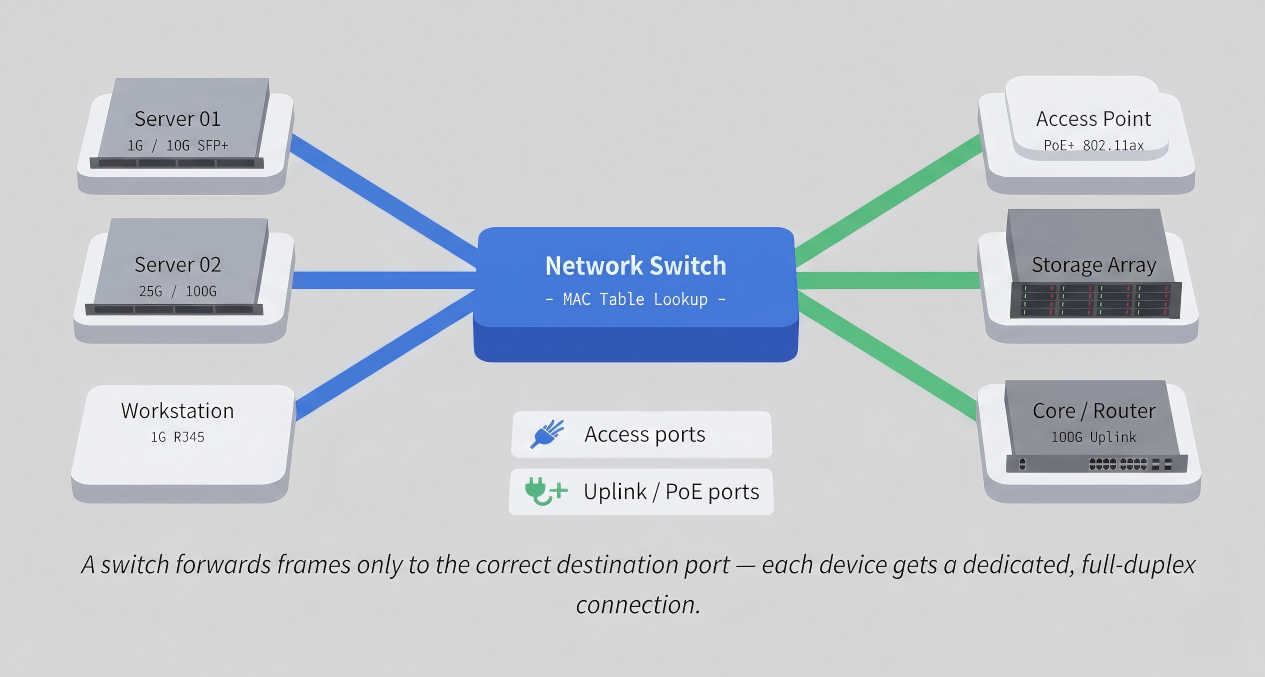
This selective forwarding is why switches dramatically outperform hubs: instead of every device competing for the same shared medium, each port operates in full-duplex, doubling effective bandwidth and eliminating collisions.
Types of network switches #
Access switches
Connect end devices (PCs, phones, APs) to the network. Typically 1G–2.5G ports with PoE. Deployed at the network edge.
Distribution / aggregation
Aggregate traffic from multiple access switches before forwarding to the core. Often Layer 3–capable with 10G–25G uplinks.
Core switches
High-speed backbone switches in the data center or campus core. 100G–800G port speeds with ultra-low latency (sub-μs).
PoE switches
Deliver both data and electrical power over Ethernet (802.3af/at/bt) to devices like APs, IP cameras, and phones.
Data center (TOR)
Top-of-rack switches connect servers directly within a rack. High port density, 25G/100G server-facing, 100G–400G uplinks.
AI fabric switches
Purpose-built for GPU-to-GPU traffic in AI clusters. Ultra-low latency (<500 ns), RoCEv2 support, and 400G–800G ports.
Layer 2 vs Layer 3 switches #
The OSI layer at which a switch operates defines its capabilities and the scale of network it can serve:
| Feature | Layer 2 Switch | Layer 3 Switch |
|---|---|---|
| Forwarding basis | MAC address (CAM table) | IP address (routing table) |
| Inter-VLAN routing | ✗ Requires external router | ✓ Hardware-accelerated |
| Protocols supported | STP, LACP, LLDP, 802.1Q | OSPF, BGP, EVPN, PIM, VXLAN |
| Typical deployment | Access edge, small LANs | Distribution, core, data center |
| Cost | Lower | Higher (ASIC complexity) |
| SONiC support | ✓ | ✓ Primary target |
Most modern enterprise and data center deployments rely on Layer 3 switches throughout to enable efficient inter-VLAN communication, ECMP load balancing, and BGP/EVPN-based overlay networks — all without routing traffic through a separate router appliance.
Managed vs unmanaged switches #
| Capability | Unmanaged | Smart / Web-managed | Fully managed |
|---|---|---|---|
| VLAN configuration | ✗ | Limited | ✓ 802.1Q, QinQ |
| CLI / API access | ✗ | Web GUI only | ✓ CLI, REST, gNMI, NETCONF |
| QoS / traffic shaping | ✗ | Basic | ✓ Granular per-class |
| Redundancy (LACP, STP) | ✗ | Partial | ✓ Full |
| Port mirroring / SPAN | ✗ | ✗ | ✓ |
| Open NOS (SONiC) support | ✗ | ✗ | ✓ Fully programmable |
| Target use case | Home / SOHO | SMB / branch | Enterprise / data center |
For enterprise and data center environments, only fully managed switches provide the visibility, automation, and protocol support required. They expose standard management interfaces — SSH, SNMP, gNMI streaming telemetry, and REST/NETCONF APIs — that integrate with orchestration platforms and monitoring stacks.
SONiC and open networking switches #
Traditionally, network switches were closed systems: the hardware ASIC, the operating system, and the management software all came from a single vendor. This created lock-in, inflated margins, and slow innovation cycles. Open networking breaks this model by decoupling hardware from software — much like how the PC industry separated the CPU from the OS.
Open Networking OS
What is SONiC?
Software for Open Networking in the Cloud (SONiC) is a Linux-based, open-source network operating system originally developed by Microsoft for its Azure data centers. It runs on commodity switch ASICs from multiple silicon vendors (Broadcom, Marvell, Intel, Barefoot) through a standardised Switch Abstraction Interface (SAI) layer.
SONiC’s modular, containerised architecture separates each network function (BGP daemon, LLDP, SNMP, Port Manager) into an independent Docker container. This means individual components can be updated, restarted, or replaced without reloading the entire switch — enabling zero-downtime upgrades and fine-grained troubleshooting.
Key advantages of SONiC-based open switches
Why enterprises and hyperscalers choose open networking
→ Hardware/software decoupling: Choose the ASIC that matches your port-speed and latency requirements, then run SONiC regardless of the hardware vendor.
→ Community innovation: SONiC is backed by Microsoft, Alibaba, Dell, Broadcom, and hundreds of contributors — new features ship faster than any single-vendor roadmap.
→ Programmability: Full gNMI/gRPC streaming telemetry, NETCONF, and REST APIs enable integration with Prometheus, Grafana, Ansible, and Kubernetes-native network automation.
→ Cost reduction: Removing the closed-OS license tax typically reduces total switch cost by 30–60% compared to equivalent proprietary platforms.
→ Protocol completeness: BGP (FRRouting), OSPF, EVPN-VXLAN, PTP, ECMP, LACP, and QoS are all available in SONiC out of the box — enterprise-grade, not stripped down.
Enterprise SONiC: addressing community limitations
Community SONiC is powerful, but requires significant internal expertise to deploy, harden, and maintain in production. Enterprise SONiC distributions — like AsterNOS from Asterfusion — address this by layering a tested, supported software stack on top of the open-source foundation, adding:
- Certified hardware compatibility across the full 1G–800G port-speed range
- Long-term support (LTS) release tracks with security backports
- Unified management through a centralised controller (AsterMOS) covering campus APs, switches, and routers
- Zero Touch Provisioning (ZTP) for rapid, automated deployment at scale
- Professional support SLAs replacing the on-call forum model of community software
ASIC families supported Marvell Teralynx, Prestera, Falcon; Broadcom Tomahawk, Trident
Port speeds 1G · 2.5G · 10G · 25G · 100G · 200G · 400G · 800G
Latency (cut-through) ~500 ns (data center fabric switches)
Protocols BGP, OSPF, EVPN-VXLAN, PTP, ECMP, LACP, 802.1Q, 802.3ad
Management interfaces CLI, REST API, gNMI, NETCONF, SNMP, Prometheus/OpenTelemetry
AI data center features RoCEv2, ECN, PFC, lossless Ethernet for GPU-to-GPU workloads
Use cases by deployment scenario #
| Scenario | Switch tier | Recommended port speed | Key features needed |
|---|---|---|---|
| Campus / office floor | Access | 1G–2.5G PoE+/PoE++ | PoE budget, VLAN, 802.1X NAC, OpenWiFi controller integration |
| Campus core | Distribution / core | 10G–100G | Layer 3 routing, OSPF/BGP, redundant power, stacking |
| Enterprise data center (TOR) | Top-of-rack | 25G server / 100G uplink | EVPN-VXLAN, ECMP, low latency, SONiC + gNMI telemetry |
| AI / HPC cluster fabric | Spine / fabric | 400G–800G | RoCEv2, lossless Ethernet (PFC + ECN), sub-μs latency, large buffer |
| Internet exchange / service provider | Core | 100G–400G | Full BGP table, MPLS, EVPN, high availability, 99.999% uptime |


